Stripe Payment Intents
Centra supports two integration options with the Stripe Payment Intents API. For all new implementations, Stripe Elements should be used.
If you're considering migration from the legacy Payment Request Button to Stripe Elements, see the comparison table below for the key differences.
| Integration | Status | Payment methods | API approach |
|---|---|---|---|
| Stripe Payment Intents with Stripe Elements | Recommended by Centra and Stripe | Dynamic — 100+ methods Stripe can expose (cards, wallets, bank redirects, etc.), driven by your Stripe Dashboard and dynamic payment methods when configured in the plugin | API-first: paymentInstructions return clientSecret and Stripe fields for your client; you implement Payment Element on your storefront |
| Stripe Payment Intents with Payment Request Button (Legacy) | Legacy | Limited — typically Apple Pay, Google Pay, or Link, depending on browser, device, and whether the shopper is signed in | Centra's API returns a ready-made formHtml snippet and the injectable script dispatches the related DOM events (centra_checkout_*) |
:::info New integrations: use Stripe Elements All new implementations should use Stripe Payment Intents with Stripe Elements. This is the recommended path that we intend to maintain and evolve long-term.
The Payment Request Button (Legacy) integration exists only for backwards compatibility with existing storefronts.
Support is limited to critical bug fixes. :::
Set up
To configure the Stripe Payment Intents plugin in Centra, go to store plugins, select the plugin, and you should see a screen similar to the screenshot below.
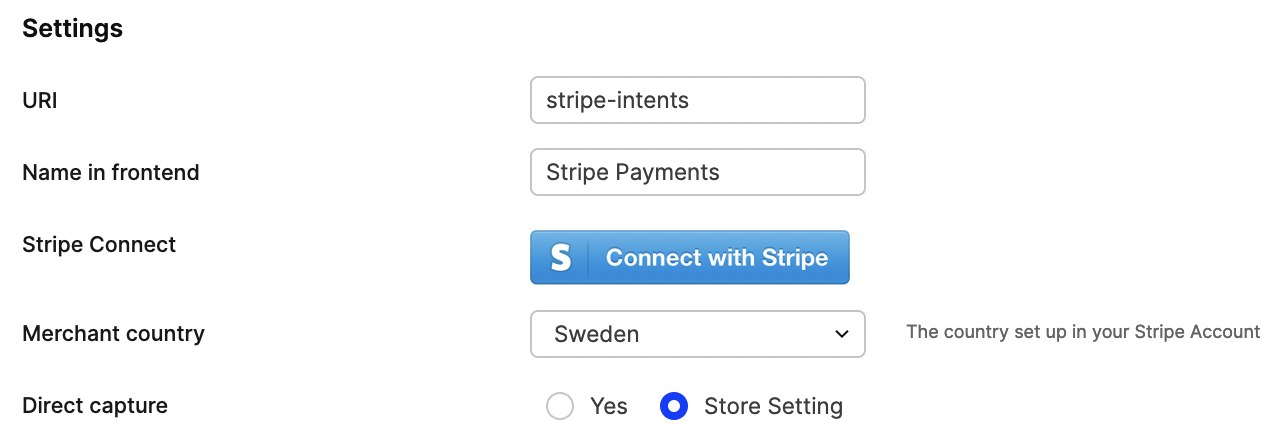
Click Connect with Stripe and follow the steps on Stripe’s side. That binds your Stripe account with Centra’s integration so you can accept payments.
Depending on Test mode in the plugin, the connection uses either your Stripe test or live account.
You can also restrict the plugin to specific markets, pricelists, countries, or languages.
See also
- Stripe Checkout (hosted Stripe Checkout page — different integration)
- Payment flows (generic Centra payment steps)