External Gift Cards
External Gift Cards plugin connects Centra to an External Gift Card Provider enabling merchants to accept gift card payments in Centra using a gift card issued by a third-party provider.
Centra supports direct integration with Shift4 (formerly GiveX) and exposes custom Gift Cards SPI (Service Provider Interface) enabling partners to build an integration towards any third-party gift card provider and Centra.
Supported payment scenarios
-
100% gift card - The gift card balance covers the entire order total. There is no remaining amount to pay using a regular payment method such as a credit card.
-
Split payment - Gift card balance convers part of the order total. Remaining amount needs to be paid using a regular payment plugin.
Centra supports both digital and physical gift cards (bought online or in store) - as long as they are active and have available balance.
Connection modes
In AMS, the External Gift Card plugin Connector dropdown chooses how Centra talks to the issuer network: Gift cards SPI (custom) (your middleware URL), or a direct connector where Centra calls a supported provider's API with no middleware in between.
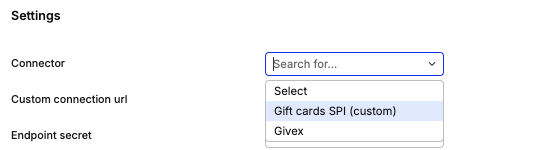
Gift Card SPI (Custom connector)
Centra calls your integration's HTTPS endpoint. You integrate directly towards a 3rd party Gift Card Provider API.
Supported Gift Card SPI actions:
balance_check- Check the balance on a gift card.authorize- Reserve funds on a gift card.capture- Capture reserved funds on a gift card.release- Full cancellation or partial cancellation of reserved funds.issue- Refund - Issue a digital gift card.

- Checkout-time HTTP actions sent to your
Custom connection URL:balance_checkandauthorize(fund reservation / pre-authorization after the order exists). Requests are signed withX-Centra-Signatureusing the configured Endpoint secret (timestamp + body). - Plugin fields (AMS): status, name, connector, custom connection URL, endpoint secret, merchant ID, store number, optional automatic order cancellation on failed authorization, Direct capture (plugin or store default), and standard country / market / pricelist restrictions.
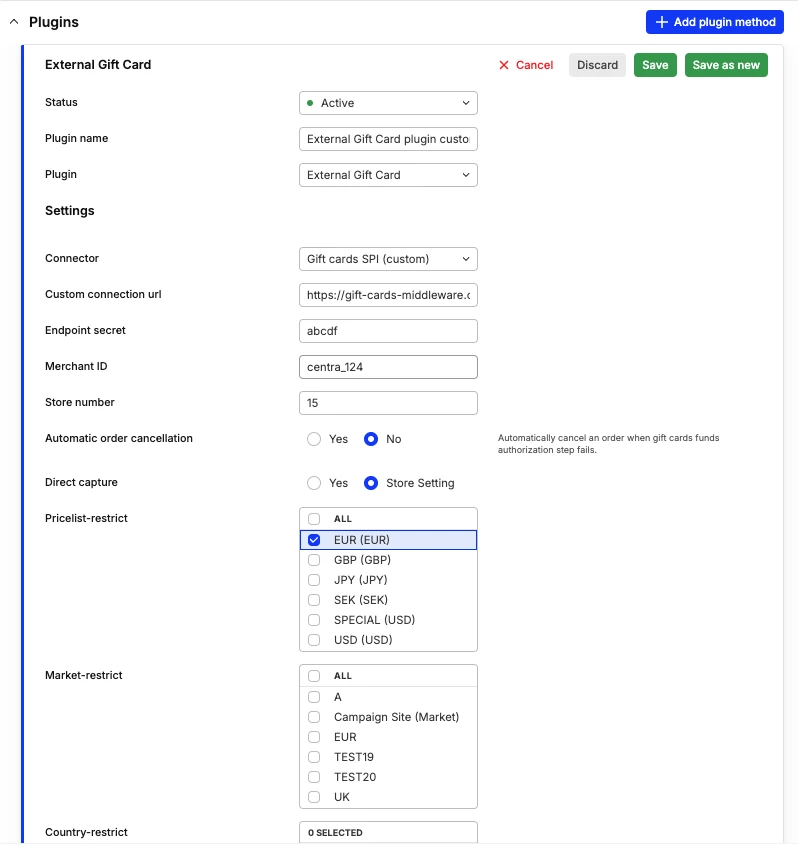
The full JSON contract (payloads, response shapes, and any post‑capture operations your middleware must support) is provided as Gift Card SPI documentation when you onboard as an integration partner - ask Centra for the current schema pack.
Direct Integration connector
With a direct connector there is no middleware URL in the plugin: Centra calls the provider's API from the platform. Onboarding, credentials, and behavior are supplied by Centra in a separate package.

Multiregional setups
Redemption can be enabled per currency / market / country by creating multiple External Gift Card plugins (each with its own restrictions and, usually, its own provider account).

Features
-
Redeem physical or digital cards in Checkout API or Storefront API.
-
Split payment orders: gift card + regular payment on the same order.
-
Flexible gift card application: Centra supports adding a gift card at any point in the customer journey, including:
- Product page
- Basket page
- Checkout page
-
Multiregional setup: Standard regional plugin restrictions supported by Centra.
Selling vs redeeming
Redemption of external gift cards is supported in Centra out of the box (configure the External Gift Card plugin). Selling external gift cards requires custom development on your side, or using your gift card service provider's capabilities.
- Redeeming external gift cards requires plugin configuration in Centra, and custom development if the Gift Card SPI (custom) connector is selected (your middleware implements the SPI contract).
- Selling digital external gift cards can be achieved by leveraging native gift certificates functionality and custom integration with an external gift card service provider for issuing.
- Selling omnichannel external gift cards can use your gift card service provider's capabilities (for example a dedicated checkout for gift cards). Another option is gift cards as regular products in Centra together with custom integration with your gift card service provider for issuing.
Building blocks - how selling / issuing relates to redemption in Centra (generic pattern; your project may use only part of it):
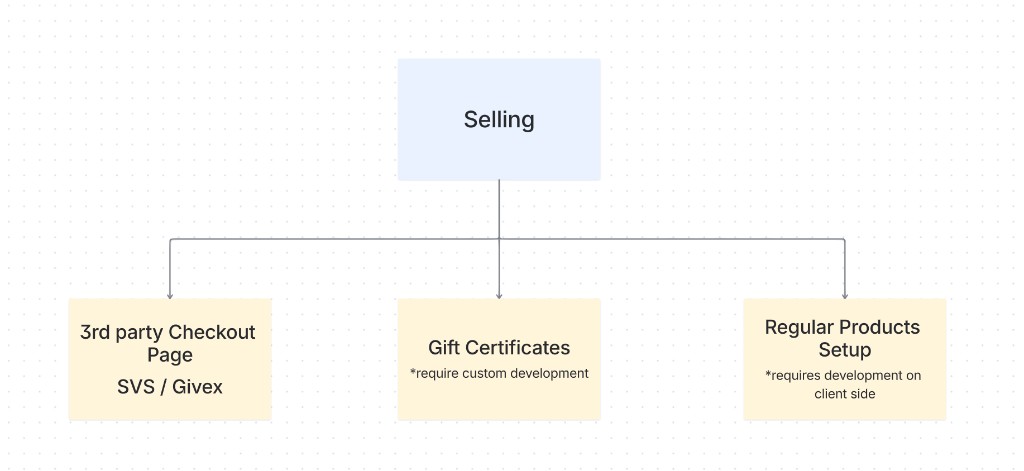
Note: Gift certificates in this diagram are Centra's native selling path. Selling external gift cards through gift certificates still requires custom development.
The diagram mentions Givex or SVS only as examples of third-party issuers behind a hosted or partner checkout, not as references to any specific retailer.
Typical combinations (examples only - your architecture may differ):
| How cards are sold / issued | How shoppers redeem in Centra |
|---|---|
| Provider-hosted shop or partner checkout | External Gift Card plugin |
| Centra gift certificate product | Built-in gift certificate → voucher flows (not this plugin) |
| Normal product SKU + your systems issue codes | External Gift Card plugin or internal credit vouchers, depending on how codes are modeled |
Checkout and gift cards
Apply gift cards in the same phase as other selection changes (vouchers, lines, shipping): Centra runs the issuer balance check, persists encrypted card data, and updates totals as a credit voucher on the selection.
Continue with the same checkout and payment sequence documented for your stack: Checkout and Payment flows for Storefront API, and the migration table for Checkout API parity - any remaining grandTotal follows the same PSP steps as a cart without gift cards.
Typical runtime (high level)
- Gift card applied to the selection - Shopper adds gift card on the product page, basket page or in the checkout; Centra runs the balance check action and stores encrypted gift card details on the selection.
- Credit voucher on the selection - Centra creates a credit voucher for the amount of available gift card balance. Credit voucher is an internal representation of the applied gift card in 1-1 mapping.
- Selection total updates - If selection grand total changes e.g. item is added or removed - Centra recalculates totals incl. previously applied gift cards automatically.
- Regular PSP payment (if needed) - when
grandTotalis not fully covered by the gift card, the shopper pays the remainder using regular Centra payment plugin. - Order placed - Checkout completes and the order is created.
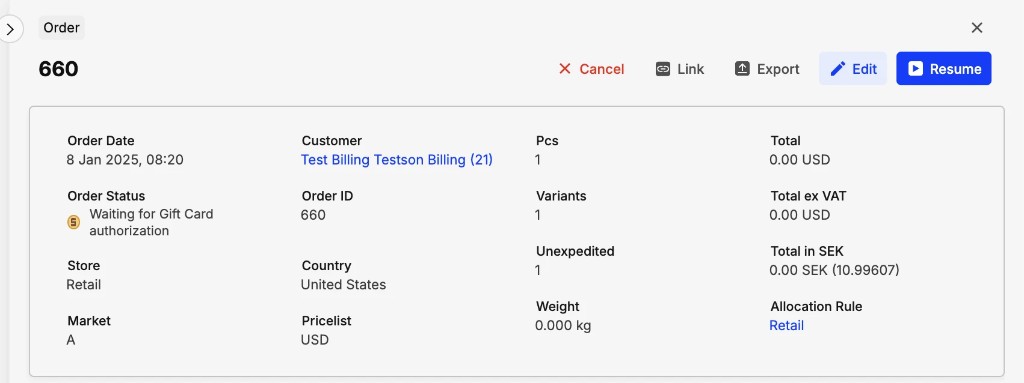
- Hold and Waiting for Gift Card Authorization - The order is put on Hold with Waiting for Gift Card Authorization flag until funds are reserved on the gift cards.
- Automatic authorization (gift cards funds reservation) runs in the background.
- Order moves to pending/confirmed status - Once gift card funds are successfully authrized, the order moves to Pending or Confirmed status and can be shipped to the customer
AMS: Waiting for Gift Card Authorization flag
Automatic authorization with the gift card provider
After order creation, Centra automatically calls the gift card provider to reserve funds on gift cards applied to that order.
Upon successful authorization of funds - Waiting for Gift Card Authorization and Hold flags are removed and the order moves to Pending or Confirmed status.
Frontend integration
When to show the gift card field
Checkout API: GET /selection includes externalGiftCardAvailable when an active External Gift Card plugin matches the selection (restrictions and store configuration).
Storefront API: the Selection type exposes externalGiftCardAvailable (Selection reference).
Apply gift card
Checkout API
POST /gift-card-apply
{
  "cardNumber": "1234555523335555",
  "pin": "1234"
}
Storefront API
Use the applyGiftCard mutation with cardNumber and optional pin in the input (same semantics as Checkout API).
Remove gift card
Checkout API: remove the applied code voucher like any other voucher, e.g. DELETE /vouchers (or the voucher-specific delete your integration already uses).
Storefront API: removeVoucher.
See also the API comparison table.
Applied card on the selection
Externally applied cards appear alongside other vouchers / discounts. Typical traits:
- Names like
GiftCard_<id>_<lastFour>for display and reconciliation. - Credit type (amount off the order).
isExternal: true andlastFourDigitswhere the API exposes them (Checkout API voucher object; Storefront API discount metadata - see vouchers for discount shape).
You can present each applied card on its own row in checkout (for example a label with the last four digits of the card number) so shoppers can distinguish them.
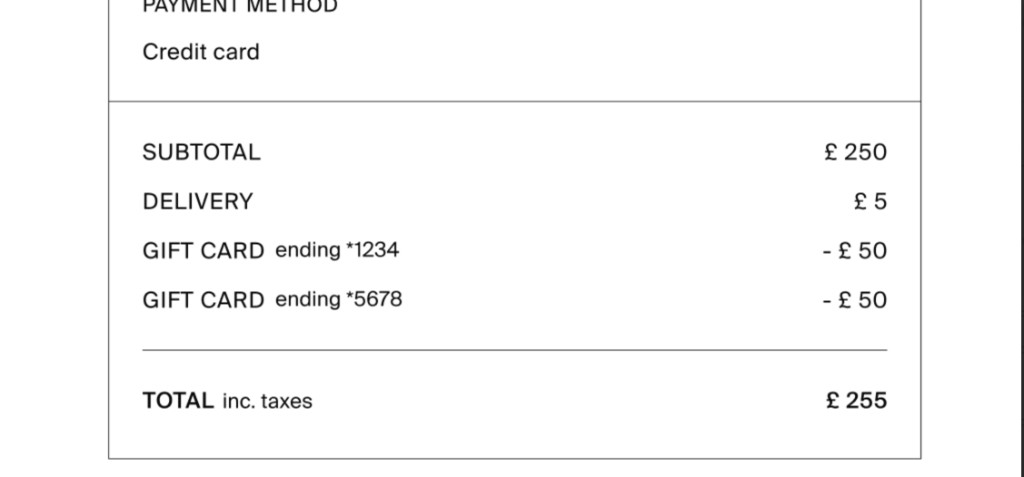
For a standard headless build, wiring applyGiftCard, removeVoucher, and selection totals is usually a small frontend effort compared to PSP work.
Error codes (balance check / apply)
These machine-readable codes are returned when apply fails (Checkout API: errors array; GraphQL: errors on the mutation). They are defined in application code and safe to branch on in the storefront.
| Code | Meaning |
|---|---|
internal_error | Unexpected failure (e.g. malformed provider response). |
invalid_input | Validation failed (unknown card, wrong PIN, malformed input). With the SPI (custom) connector, an empty PIN is rejected as invalid_input at balance check. |
inactive_card | Card inactive or not usable. |
insufficient_funds | Balance lower than required amount. |
invalid_gift_card_currency | Card currency does not match the selection pricelist currency. |
empty_card_balance | Zero balance. |
gift_card_rate_limit_exceeded | Too many apply attempts for the selection; see Rate limiting below. |
Example (Checkout API style):
{
  "errors": ["invalid_gift_card_currency"]
}
Order management
AMS capabilities
From AMS you can capture or cancel gift card authorizations in line with ordinary payments for supported setups. Refunding external gift card value is not exposed as a single AMS button for all configurations - after capture, expect to use Integrations API / provider processes depending on your connector and PSP.
You cannot top up or edit an external card’s balance inside Centra; reconciliation happens in the issuer’s portal (using serial or reference fields from transaction details where your program exposes them).
Payment history and types
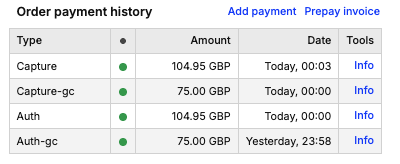
AMS lists combined payment history for the order. Gift card rows use the same lifecycle as card payments but with a -gc suffix on the type string, for example:
auth-gc- authorization / reservationcapture-gc- capture (final deduction against the provider where applicable)cancel-gc- canceled authorizationrefund-gc- refund path where supported
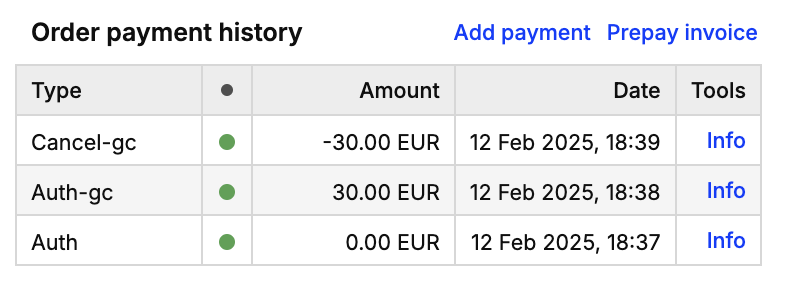
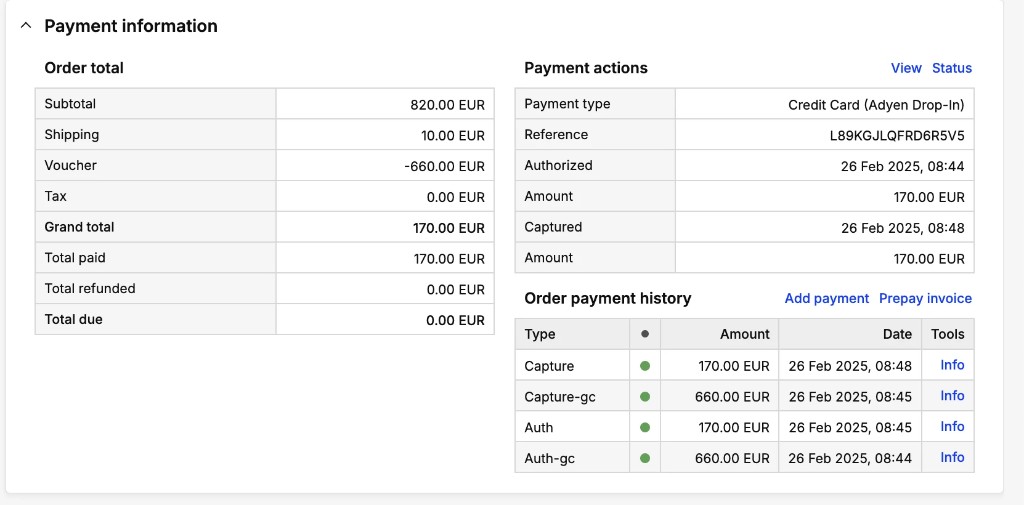
Split auth and capture for both PSP and gift card on one order:
AMS: totals and “discount” rows
Externally paid value appears as a discount (credit voucher) line on the order (name prefix GiftCard_), while the grand total reflects what remains for the PSP.
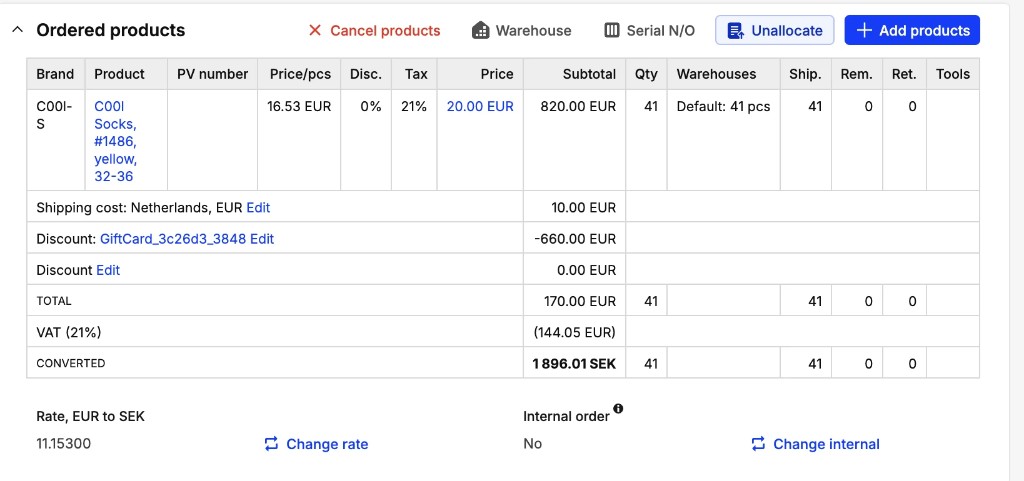
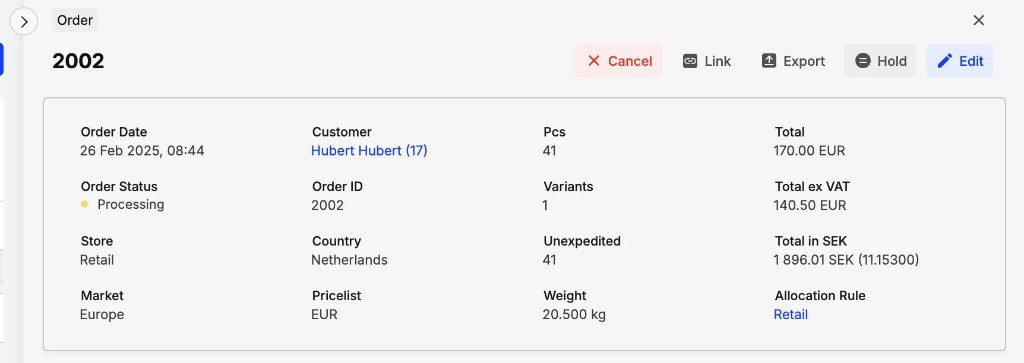
Each application also creates a short‑lived credit voucher row in voucher lists (typically Code, Credit, max use 1, ~1 hour validity). That row is the Centra-side mirror of the external application, not the issuer’s master record:

Integrations API
Automated flows (ERP, OMS, custom middleware) should use the Integrations API GraphQL:
- Capture:
captureOrder,captureShipment, orcreateShipmentwith capture as appropriate - same mutations as for the rest of the order; gift card portions produce gift card capture history when the capture pipeline runs. - Cancel before capture:
cancelDirectToConsumerOrderwithcancelAuthorization: trueso that gift card authorizations are released together with the PSP where applicable. - Release unused authorization:
releaseRemainingOrderAuthorization(gift card side effects follow the same payment history patterns as cancellation for GC rows where applicable).
Payment history query: pass includeGiftCardsPaymentHistory: true so gift card transactions are included in the unified payment history list.
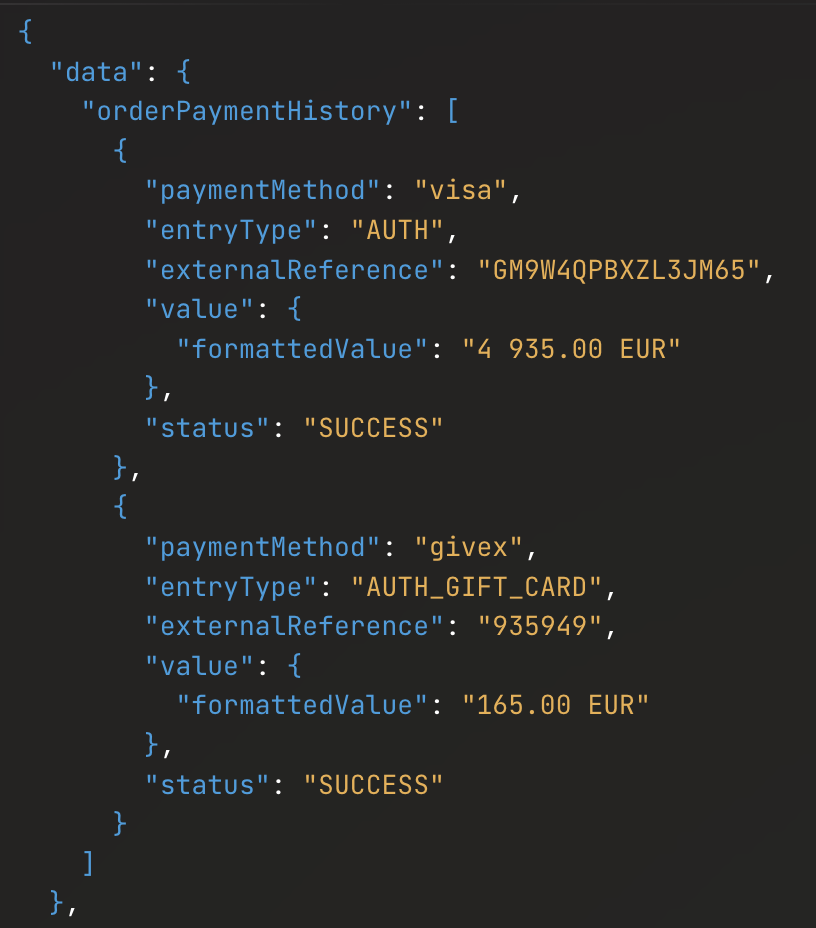
Naming - AMS vs Integrations API: AMS uses string types such as auth-gc / capture-gc. The Integrations API returns structured entryType values (for example AUTH next to AUTH_GIFT_CARD, and CAPTURE next to CAPTURE_GIFT_CARD) plus paymentMethod and externalReference from the provider channel - use these fields when building dashboards or ERP feeds.
Example shape - split payment order payment history (values illustrative):
Reconciliation: use the order’s gift card / discount breakdown from the Integrations API to list each applied voucher and amount. When several cards reduce the total to zero, grandTotal reflects that while per‑card rows remain inspectable:
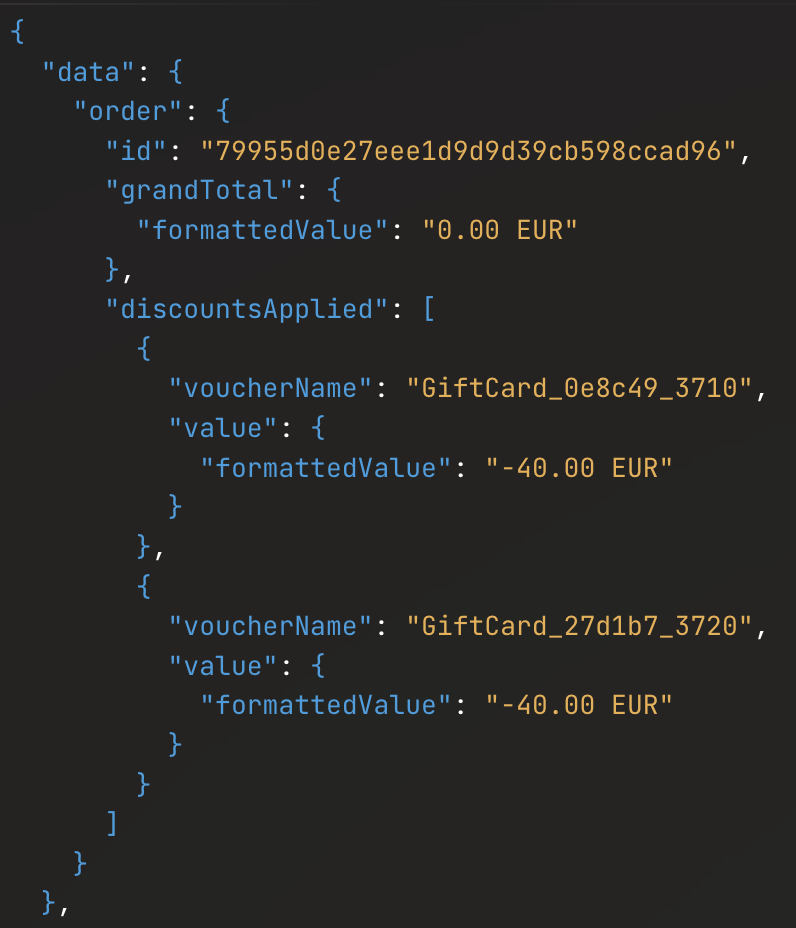
Machine‑readable breakdown is preferable to parsing AMS labels alone when you rebuild gross merchandise value or tax bases for finance.
Refunds
- SPI (custom) connector - refund and re‑issue style operations are defined in the SPI / onboarding pack from Centra (not duplicated on this page).
- Split payment (gift card + PSP) - today you typically calculate the split (amount back to the card program vs amount to the PSP), run card refunds through your PSP integration, and run gift card refunds through the Integrations / provider path your project agreed on. End‑to‑end orchestration in a single mutation is not guaranteed; confirm the roadmap with Centra if you need a packaged split‑refund flow.
Examples of Integration API shapes live alongside other DTC topics in example queries.
Order cancellation in AMS
Canceling an order from AMS before capture should cancel both the ordinary payment authorization and gift card authorizations. After capture, use refund flows instead of cancel where required by your PSP and gift card program.
Credit voucher behind the scenes
When a shopper applies an external card, Centra creates a credit voucher tied to that application (shown in AMS as a credit-type voucher). That voucher is scoped to the selection and expires one hour after creation; after expiry the shopper must apply the card again (triggering a new balance check).
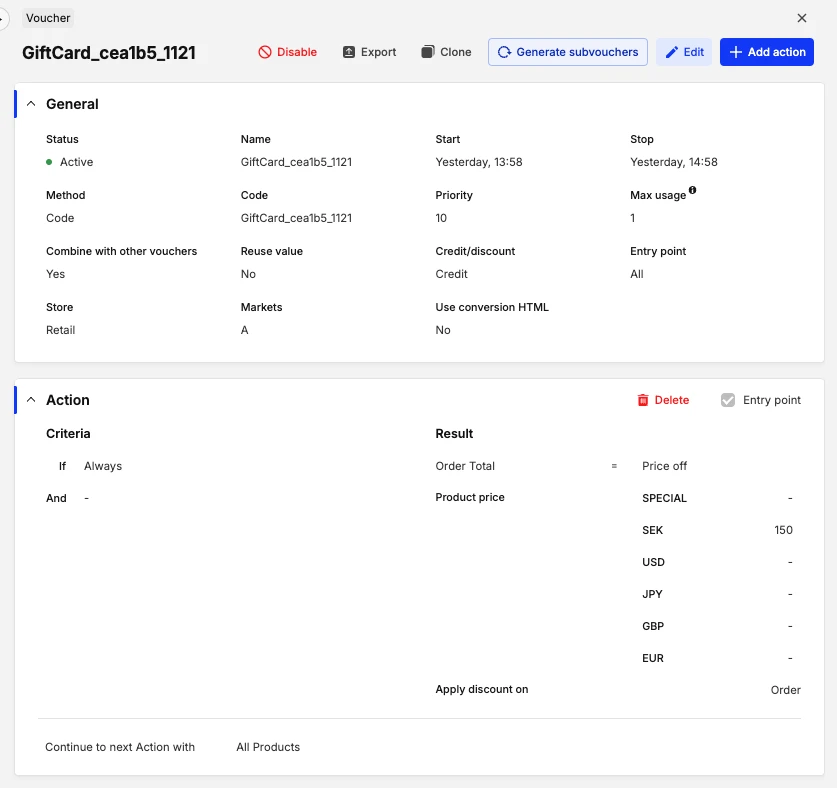
Centra is not the issuer: the balance shown is the balance returned at apply time, not a live synced wallet.
Limitations and accounting implications
| Topic | Detail |
|---|---|
| Order total / reporting | Applied external gift cards reduce the order total (credit voucher). Reported revenue and exports reflect the reduced total unless you reconstruct gross using breakdown / line data from the Integrations API. |
| Tax | External gift cards are applied after tax is calculated on the selection, so the shopper always sees the correct tax amount, including US sales tax and other tax-on-top setups. The gift card credit then reduces what remains to pay and can cover the tax portion of the order (alongside product and shipping). Campaign discounts and tax still run through Centra’s normal basket pipeline before that reduction. Use the Integrations API monetary fields for automation - some AMS tax summaries can look sparse when the grand total is zero, even though tax rules still apply on the order. |
| Currency | No cross‑currency redemption: the card must match the selection currency. Use multiple plugins (and provider accounts) per currency / region. |
| Double spend | Balance at checkout is informative; authorization after order placement is authoritative. A second order racing the same balance fails authorization and can remain held / failed unless you use automatic order cancellation on authorization failure. |
| Data retention | Card numbers and PINs are encrypted (AES‑256) in Centra; they are not shown in AMS and are not accessible to Centra staff. |
| Selling gift cards | Selling (issuing) Centra gift products is separate from external redemption; see internal product docs and gift certificates for Centra‑issued certificates. |