Paid customizations
How to set up paid customisations
While Centra allows you to add free text or simple choices to a product via attributes, paid customizations (like gift wrapping, engraving services, or premium monogramming) are best handled by creating separate products.
This approach ensures that your revenue reporting is accurate and your ERP/WMS knows exactly which "extra" items need to be fulfilled.
Step 1. Follow steps 1 and 2 from the previous artcile
Click here to learn how to use orderline attributes.
Step 2. Create customizations as separate Products
To charge for a customization, you must create it as a standalone product in the Centra AMS.
- Create a new product: For example, "Gift Wrapping" or "Custom Engraving."
- Use Variants for tiered pricing: If you have different levels of service (e.g., "Standard Wrapping" vs. "Premium Velvet Box"), create these as variants of the same product so they can have distinct prices.
- Stock Management: If you wish to always be able to sell these customizations, you may enable preorder on this product, so that the stock is always "infinite".
Step 3. Link customizations to eligible products
Centra doesn’t provide a pre-defined relationship between a customisation SKU and a specific main product SKU. To manage eligibility on the storefront, use Custom Product Relations (or handle the logic entirely in your frontend).
In Centra AMS
- Use the "Relations" feature to connect list the IDs of the customisation products applicable to a specific item. Link to this feature?
On the frontend
- Your PDP logic should fetch these related IDs. If a user selects "Add Engraving," the frontend will know exactly which Service SKU to add to the basket alongside the main product.
Alternative approach
- Skip Relations and maintain the “which customisations apply to which products” mapping in your storefront implementation.
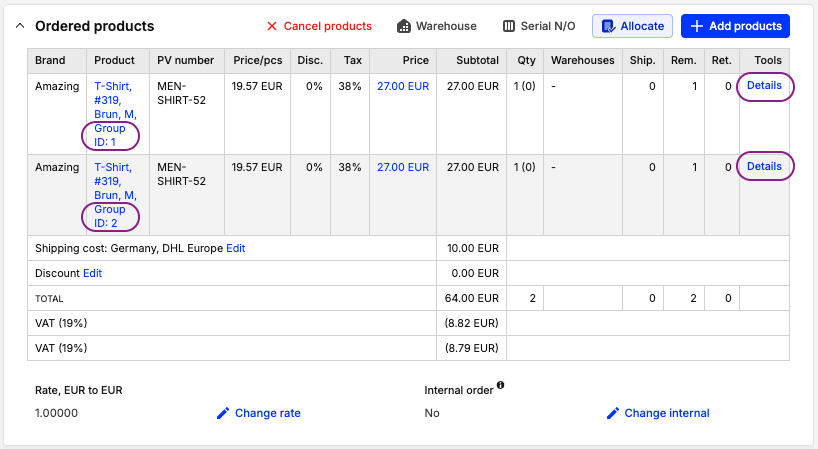
Step 4. Group basket/order lines using a shared Group ID
Because the main product and the customization are separate lines in the basket, you need a way to "glue" them together so the warehouse team knows which engraving belongs to which watch.
Solution: A shared group ID
- Create a per-line attribute in Centra AMS, e.g.,
group_id(set it as a per line attribute). - When the user adds the product + customisation, generate a unique group value in the storefront and assign it to both lines.
- Pass the
group_idvia the Storefront API when adding the lines to the basket.